

Multi-location SEO is the work of making each of your branches, offices or service areas findable by the people closest to it, while keeping one brand and one website behind them. It succeeds when every location has its own useful page, its own accurate Google Business Profile and its own reviews, all fed from one source of truth. It fails when locations are copies of each other, listings disagree and nobody owns the data. We build this as one plan, in-house, so the pieces hold together instead of being sold as disconnected tasks.
TL;DR
- Each physical location needs its own page, its own Google Business Profile and its own reviews. A city name swapped into a template does not count.
- Keep name, address, phone and hours identical everywhere, drawn from one master record.
- Service-area businesses (trades, home services) work differently: one profile per real office, with a defined service area, not a fake address per city.
- Measure per branch: calls, direction requests, bookings and form fills, not only rankings.
- Ownership matters: the domain, listings and data should belong to you from day one.
Table of Contents
- What multi-location SEO is, and why a single-location plan breaks
- Decide what counts as a location
- Build location pages that deserve to rank
- Google Business Profiles: one per location, one owner
- Keep listings consistent everywhere
- Reviews are a location-level asset
- Coordinate head office and local teams
- Measure each branch by leads, not only rankings
- A 90-day order of work
- Our perspective
- Where to start with us
- FAQ
- Sources
What multi-location SEO is, and why a single-location plan breaks
With one shop, local SEO is a short checklist. With three, ten or forty, the same checklist has to be repeated without drifting. Google says local results are based mainly on relevance, distance and prominence, and that is true at any size. What changes is the operational load: more listings to keep accurate, more pages to write, more reviews to answer, more people with access.
That is where most multi-location plans fail. A dentist with four clinics in Ontario, a salon group with locations across the Greater Montréal area, or a plumbing company serving six suburbs all hit the same problems:
- Conflicting data. When directories, data aggregators and mapping apps show different details for one branch, search engines struggle to confirm that the records point to the same physical place. A moved suite number or an old phone line is enough.
- Thin, duplicated pages. One template with only the city name changed gives Google no reason to show that page over another.
- Locations competing with each other. Overlapping content between head office and branches, or between branches, splits your own visibility.
- No owner. Profiles created by a former manager, an agency or a franchisee years ago, still sitting under someone else’s login.
A good local marketing strategy for a multi-location business is therefore less about tricks and more about structure: one brand, one data source, many well-built local entry points.
Decide what counts as a location
Before building anything, sort your business into the right model, because Google treats them differently.
| Business type | Examples | What gets a profile |
|---|---|---|
| Storefront or branch where customers visit | Restaurants, salons, clinics, brokerages, architecture studios | One profile per staffed, customer-facing location |
| Service-area business | Plumbers, HVAC, roofers, landscapers, cleaners | One profile for the real office, with a designated service area |
| Hybrid | A shop that also delivers or visits clients | A profile for the shop, plus a service area |
Google’s own guidelines say that service-area businesses should have one profile for the central office or location with a designated service area. The same page asks you to represent the business as it is known in the real world, on signage and stationery. For trades, the physical office is often just an administrative base, so building a separate profile for every town you drive to is the wrong move. Cover those towns through service-area pages on your site instead. If you are a home service company, our guide to local SEO for home service businesses in Canada goes deeper on that setup.
Build location pages that deserve to rank
Your website is the one asset you fully control, so the location page is the centre of the system. A page earns its place when it proves the branch is part of its neighbourhood. Search Engine Journal’s guide to multi-location local SEO lists what that looks like in practice:
- Services that are specific to that branch, not the full company menu pasted in.
- Real, unedited photos of the storefront, the interior and the local team.
- Reviews from customers who actually visited that branch.
- Answers to area-specific questions: parking, public transit, regional pricing.
A worked example: a four-branch physiotherapy clinic in the Ottawa region. The Kanata page names the nearby streets and the underground parking entrance, shows the Kanata team, lists the services that branch actually offers, and embeds reviews left by Kanata patients. The Orléans page does the same with its own details. Neither page can be mistaken for the other, and neither can be replaced by a template.
Structure the site so branches don’t compete
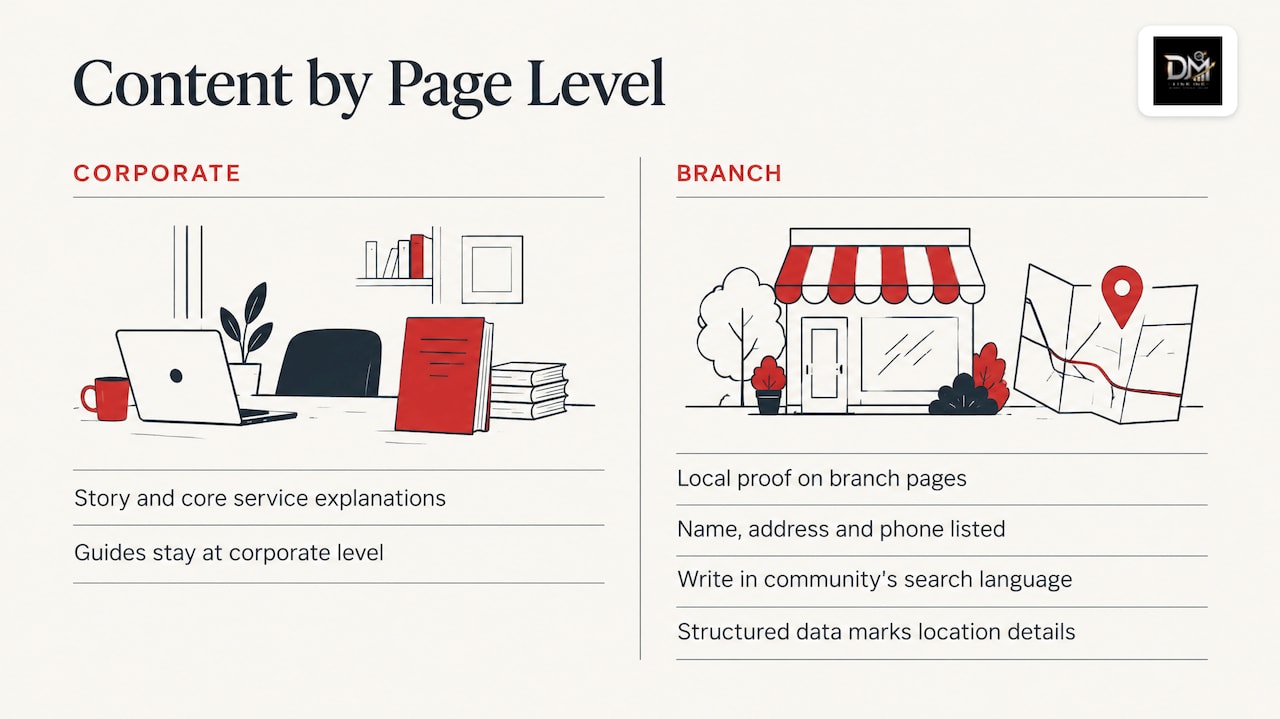
Use a clean hierarchy: a location index page, then one URL per branch (or per service area for trades), each linking back to the main service pages. Keep brand-level content, such as your story, core service explanations and guides, at the corporate level, and let branch pages carry the local proof. When head office and branches publish near-identical content, they end up competing for the same searches.
Put each location’s name, address and phone number on its page, and add structured data so search engines can read those details without guessing. If you operate in English and French, each location page should be written in the language its community searches in, by someone who writes like a local, not run through a translation tool. We cover how this plays out in Québec in our piece on local SEO for small businesses in Quebec.
A site that cannot hold this structure is usually the real bottleneck. If your pages are a patchwork from different eras, a rebuild is often faster than patching. Our website redesign page explains the signs.
Google Business Profiles: one per location, one owner
Each eligible location should have its own Google Business Profile, with the business name exactly as it appears on the storefront, the right primary category, accurate hours, and a link to that branch’s own page rather than the homepage. Google asks for the fewest categories that describe your core business, and one profile per business entity, since duplicates cause problems on Maps and Search.
The governance habits matter more than the setup:
- Centralize ownership. Hold the profiles under one business-controlled account and give managers access, not ownership. For franchises and growing chains this stops listings from staying with someone who left.
- Keep holiday and special hours current. A branch that shows as closed on a stat holiday it was open loses the customer.
- Use the profile’s own data. Calls, messages, bookings, direction requests and website clicks show how each branch is performing locally.
- Clean up duplicates early. Old listings from previous addresses split reviews and confuse search engines.
Keep listings consistent everywhere
Brand details, location data above all, should be uniform across every platform, and the best approach for multi-location brands is to have the website, directories, advertising and PR all draw from a single authoritative data source. In practice that is one spreadsheet or database with each branch’s legal name, address, suite format, phone, hours and categories, and a rule that nothing is edited anywhere else.
Google itself warns that inaccurate business information can keep a profile from appearing for relevant searches. That is why we treat local citation management as ongoing upkeep rather than a one-off clean-up: a branch opens, moves, changes hours or swaps a phone number several times a year.
Reviews are a location-level asset
Reviews feed the prominence side of local ranking, and they also shape what AI answer tools and map results say about each branch. Treat them per location: ask customers of each branch for feedback at the moment of service, reply to every review in the language it was written, and route complaints to the branch manager who can fix the issue. A head-office account that answers generically across 20 locations reads as absent.
Two guides on our site cover the mechanics: how reviews affect local SEO and Google rankings and Google review management for Canadian businesses. For ongoing oversight across branches, see brand reputation monitoring.
Coordinate head office and local teams
The cleanest multi-location setups answer one question early: who owns what?
- Head office owns the data source, the site structure, templates, brand standards, profile access and reporting.
- Branches own the local proof: photos, team details, community involvement, review replies and local offers.
- Paid and organic work together. Search Engine Land’s local search piece argues that paid and organic teams should co-optimize rather than work in silos, with all reports built from one central source so numbers agree. If you are weighing the two channels, our comparison of local SEO and Google Ads helps frame the budget split.
This is the weak point of fragmented agency models. One vendor does listings, another builds the site, a third runs ads, and nobody sees how a branch is doing overall. A single plan with one team removes the hand-offs.
Measure each branch by leads, not only rankings
Rankings alone tell you little. Search Engine Land’s multi-location guide suggests tracking per branch: local and organic rankings, listing health and reputation, Business Profile actions (calls, website clicks, direction requests), link metrics, GA4 traffic and conversions, and Search Console clicks, impressions and click-through rate.
As search results add more Google-owned features and AI summaries, Search Engine Land also notes that traditional local metrics become less revealing. The useful measures move down the funnel: impressions and rich results at the top, calls, directions, messages and appointments in the middle, and bookings, conversions and time on site at the bottom.
A simple monthly dashboard per branch needs only these lines:
| Measure | Where it comes from |
|---|---|
| Calls and direction requests | Google Business Profile |
| Form fills and bookings | Website analytics and booking tool |
| Impressions and clicks on branch pages | Google Search Console |
| New reviews and average rating | Review dashboard |
| Listing accuracy | Master data record vs. live listings |
Compare branches with each other and with their own previous months. Seasonality in Canada is real: a landscaper’s April looks nothing like their January, so judge trends year over year where you can.
A 90-day order of work
- Weeks 1 to 2: audit. List every location, every profile, every listing, who has access, and where the data disagrees.
- Weeks 3 to 4: master record and ownership. Build the single data source, claim or consolidate profiles under a business account, and remove duplicates.
- Weeks 5 to 8: location pages. Write and photograph each page with local detail, add structured data, link them from a location index.
- Weeks 9 to 12: reviews and reporting. Start per-branch review requests, set the monthly dashboard and agree who responds to what.
After that, the work becomes steady maintenance and local content, such as seasonal offers, community pages and new services as they launch.
Our perspective
Most multi-location businesses we talk to are not short of effort. They are short of a single plan. The website was built by one vendor, the listings by another, the ads by a third, and the reviews by whoever had time.
We build local visibility as infrastructure you own, rather than digital space you rent through ads. For a multi-location business that means one in-house team on one plan: location pages, Google Business Profiles, citations, reviews and reporting that all point the same way. You speak directly to the people doing the work, not an account manager.
You also own all of it: domain, hosting, site, content, accounts and data, from day one. When a branch opens, moves or closes, the change happens once, at the source, and flows everywhere. Our strategies are built on your market, your competitors and your seasons, in English and in French, written like a local.
Visibility only counts if it turns into booked calls. That is the standard we hold every location to.
DM
Where to start with us
If you are not sure where your locations are losing visibility, begin with our free Leak-Proof Audit™, which evaluates your local authority and pinpoints where visibility and revenue are leaking. From there, our SEO and local search work covers the location pages, profiles, listings and reviews, and our web design services cover a site built to carry them.
If AI answers are also part of how customers find your branches, our AI and answer engine SEO service is built for that.
FAQ
How many locations do I need before multi-location SEO matters?
Two is enough. As soon as you have a second branch or a second service area, you need separate pages, separate profiles where eligible, and consistent data across both. Starting with a clean structure at two locations is far cheaper than untangling it at ten.
Can I create a Google Business Profile for every city I serve?
Only for real, staffed locations that customers can visit. Google’s guidelines say service-area businesses should have one profile for the central office with a designated service area. Cover the other towns with service-area pages on your website instead.
Should every location have its own page on my website?
Yes, as long as the page offers something specific to that branch: its services, team, photos, reviews and local questions. Pages that only swap the city name are thin and unlikely to rank. If you serve an area without a physical branch, build a service-area page only where there is real local demand.
How do I know if multi-location SEO is working?
Track calls, direction requests, bookings and form fills per branch, alongside Search Console impressions and clicks on each location page. Rankings are a supporting signal. The test is whether each branch is receiving more real enquiries over comparable seasons.
Sources
- The Complete Guide To Local SEO For Multiple Locations, Search Engine Journal
- Local search in 2024: Key trends and tactics for marketers, Search Engine Land
- Multi-Location SEO: Boost Local Visibility for Each Location, Search Engine Land
- Guidelines for representing your business on Google, Google Business Profile Help