

If your website is not generating leads, the cause is almost never one thing. It is usually a chain: people cannot find you, the page loads slowly, the message is unclear, nothing builds trust, or the next step is hard to take. The fix is to test that chain in order, from visibility to the enquiry itself, and repair the weakest link first. Our free Leak-Proof Audit™ is built for this: it looks at your local authority and points to where visibility and revenue are being lost.
This guide is for Canadian business owners and marketing managers who have a site, have paid for it, and are not seeing calls, forms or bookings. It walks through the checks in the order that saves the most time.
TL;DR
- A site that does not produce leads has either a traffic problem (the wrong people or too few), a conversion problem (visitors arrive and leave), or both. Work out which before you spend anything.
- Slow pages cost enquiries: Google’s analysis found the chance of a mobile visitor bouncing rises 123% as load time goes from one second to ten.
- Each page needs one clear job: say what you do, who it is for, and what to do next.
- Local visibility, reviews and a site you fully own work together. Fixing one in isolation is why many redesigns change nothing.
- Start with a diagnosis, then fix in this order: findability, speed, message, trust, call to action.
Table of Contents
- First, work out which kind of problem you have
- Leak 1: People cannot find you
- Leak 2: The site is slow or broken
- Leak 3: The message is unclear
- Leak 4: Nothing builds trust
- Leak 5: The next step is hard or missing
- A fix order that saves money
- Why disjointed fixes keep failing
- What we do about it
- Our perspective
- Common mistakes when trying to fix it yourself
- FAQ
- Sources
First, work out which kind of problem you have
The phrase “not generating leads” hides two very different situations. Mixing them up is the most common reason businesses spend money on the wrong fix.
You have little traffic. Few people reach the site, so few can enquire. More design polish will not help. The work is visibility: search rankings, your Google Business Profile, directory listings and being named in answer engines.
You have traffic, but it does not convert. People arrive and leave. Here the work is on the site itself: speed, clarity, proof and the path to contact you.
You have traffic that does not fit. Visits come from searches that will never buy from you, such as job seekers, students or people in another province. The numbers look healthy and the phone stays quiet. This is a targeting problem, and it is solved with better keyword and page choices, not with a new button colour.
To tell them apart, open your analytics and answer three questions for the last 90 days:
- How many people visited, and from which channels (search, social, direct, referral, ads)?
- How many of them did something that counts as a lead: a form, a call tap, a booking, an email click?
- Which pages did people land on first, and which pages did they leave from?
If you cannot answer question two, that is your first finding. A site with no tracking on calls and forms cannot be improved on evidence. The Business Development Bank of Canada (BDC) also recommends reviewing visitor information to understand what each type of buyer is trying to do on your site, which is the same idea: know who is arriving before you change anything.
A simple lead rate is leads divided by visits. There is no single correct number, because it varies by industry, offer and traffic source. What matters is your own figure, tracked month over month, and how it differs between pages.
Leak 1: People cannot find you
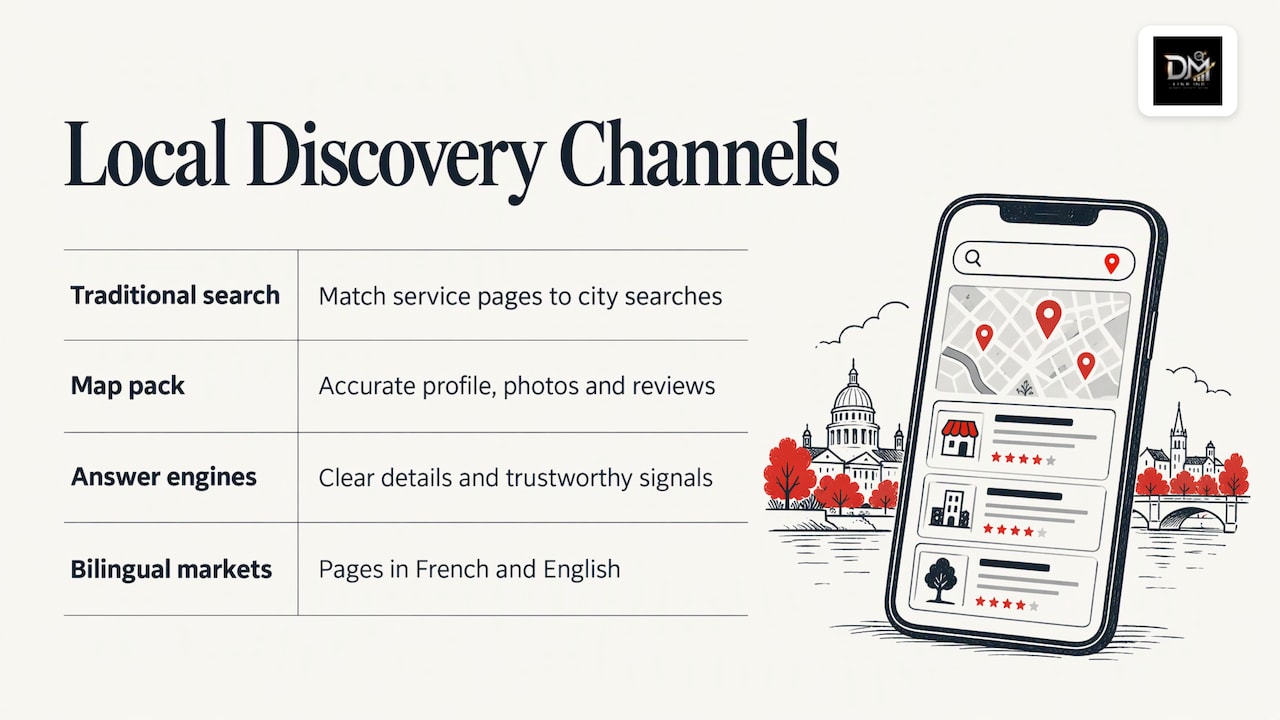
Before conversion, there is discovery. For a local business, discovery happens in three places.
Traditional search results. Your service pages need to match what people actually type, including the city or region. A page titled “Our Services” competes for nothing. A page about a specific service in a specific place has a chance. Many small business sites have one generic page for everything, which is why they rank for nothing.
The map pack and your Google Business Profile. For searches like “plumber near me” or “dentist in Laval”, the map results take the top of the page. Your profile should have accurate hours, categories, service areas, photos and a steady flow of reviews. We cover the local side in more detail in why hiring a local SEO company makes sense.
Answer engines. More people now ask a question and read a summarised answer instead of clicking through ten links. Businesses that are clearly described, consistently listed and well reviewed are more likely to be named. This is a growing part of visibility, and it rewards the same fundamentals: clear pages, consistent business details and trustworthy signals.
A quick self-check: search your main service plus your city on your phone, in a private browser window. Do you appear? Does your listing look credible next to the others? If you are invisible, no conversion fix will matter yet.
Bilingual markets add a layer. In Quebec and in many communities elsewhere, customers search in French, English or both. A site that exists only in one language can be invisible to half its local market. Pages written properly in both languages, not machine-translated, are part of local authority.
Leak 2: The site is slow or broken
Speed is the most measurable leak, and the evidence is consistent. In its analysis of mobile landing pages, Google found that as load time goes from one second to ten seconds, the probability of a mobile visitor bouncing increases 123%. The same analysis notes that mobile conversion rates trail desktop, which matters because most local searches happen on a phone.
Slow loading usually comes from the same few causes:
- Photos uploaded at full camera size instead of resized for the web.
- Too many plugins or third-party scripts (chat widgets, trackers, pop-ups).
- Cheap shared hosting that struggles under any load.
- A theme built for flexibility rather than performance.
Beyond speed, BDC’s website checklist covers the basics worth confirming: whether the site is fast enough to meet users’ needs, whether all links work, whether a sitemap exists, whether it uses SSL protection and whether content is kept up to date. A browser warning about an insecure connection, a broken contact form or a dead link on your main service page will quietly kill enquiries.
Test your contact form yourself, on a phone, this week. Many owners discover that form notifications have been going to an old email address or to a spam folder for months. That is a lead problem that looks like a marketing problem.
Leak 3: The message is unclear
Visitors decide fast whether a page is for them. A page that makes them work out what you do, who you serve and where will lose them.
Test each key page with these questions, in the first screen a visitor sees, with no scrolling:
- Can a stranger tell what you sell in five seconds?
- Does it say who it is for and where you work?
- Does it say what happens next, in plain words?
BDC quotes a useful way to think about this, which it describes as looking at the visitor’s pain and gain: what problem the visitor feels, how your site eases it, and what they expect to get. It also stresses that visitors arrive at different stages, from just becoming aware of a problem to being ready to hire. A page written only for people ready to buy loses everyone still comparing, and a page of general advice loses the ones who are ready to call.
A worked example. A Quebec landscaping company has a homepage headline reading “Quality and Excellence Since 2009”. A visitor searching “snow removal Sherbrooke” lands there and sees a slideshow. Nothing says snow removal, nothing says Sherbrooke, and the phone number is in the footer. The rewrite is not clever: a headline naming the service and the area, a one-line promise about response time, a phone number that is tappable at the top, and a short form below. The page does the same work for the same traffic, with far less friction.
The common message failures are:
- Talking about the company instead of the customer’s problem.
- Vague claims (“innovative solutions”) with no specifics.
- One page trying to serve every service and every audience.
- Jargon the customer would never use when searching.
If you serve distinct industries or services, each deserves its own page. We have written about how that plays out for home service businesses, construction companies and dental clinics, where the customer’s questions and fears differ sharply.
Leak 4: Nothing builds trust
Local buyers are choosing someone they will let into their home, their finances or their health. They look for proof before they reach out.
The proof that moves people, in rough order of weight:
- Reviews. Recent, specific, and answered by the owner. A listing with a few reviews from three years ago looks abandoned.
- Real photos and names. Your team, your vehicles, your finished work. Stock images signal that you have nothing real to show.
- Specifics about your process. What happens after someone enquires, how quickly you reply, what a first appointment looks like.
- Credentials and membership. Licences, associations and certifications, stated plainly where they apply.
- Consistent business details. The same name, address and phone number on your site, your profile and your directory listings.
Review management is not a side task. It sits between visibility and conversion: reviews influence whether you appear in local results and whether a visitor believes you once they arrive. A steady, simple routine of asking every satisfied customer, replying to every review and watching for new ones is worth more than a one-time push. Our guide to brand reputation monitoring covers what to track and how to act on it.
Leak 5: The next step is hard or missing
This is where interested visitors drop out. The path from “I want this” to “I have contacted them” should be short, obvious and low-effort.
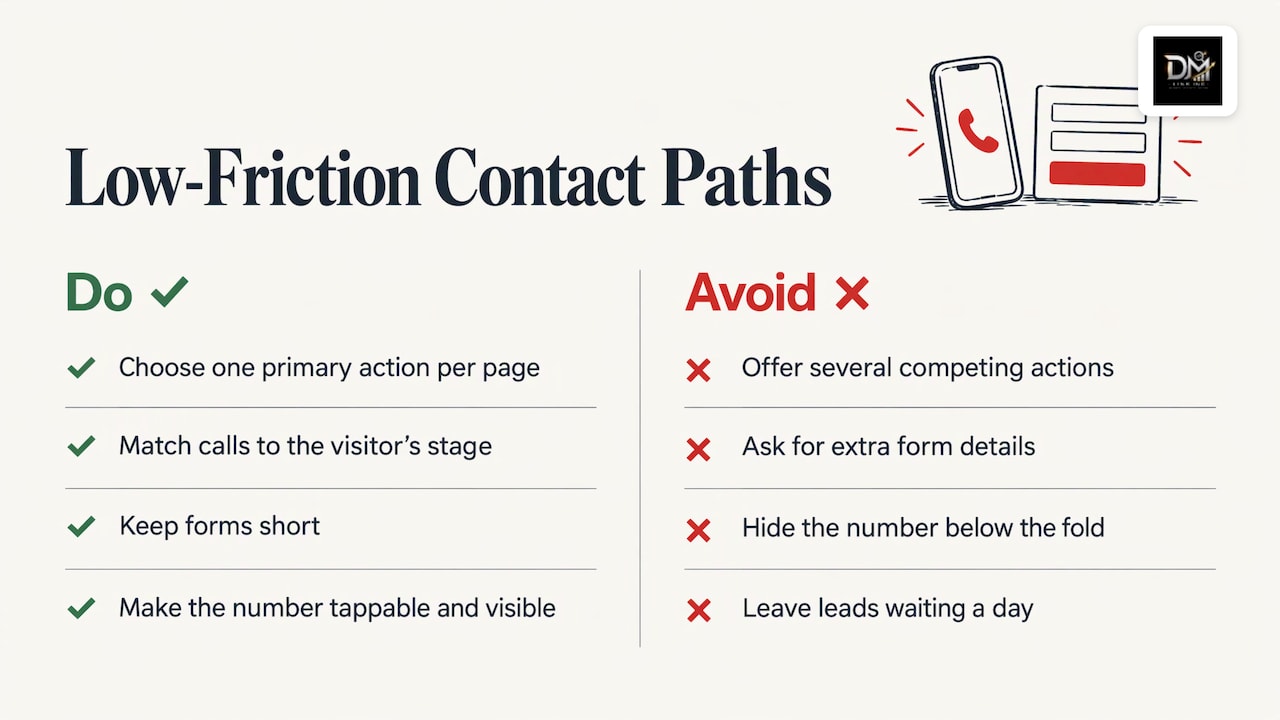
One primary action per page. If a page offers a call, a form, a newsletter, a chat and three downloads, people do none. Pick the main action and make secondary ones visually quieter.
Match the action to the visitor’s stage. Someone reading a how-to article is not ready to book a consultation, but might take a checklist. Someone on a pricing or service page is closer to a decision and should see a direct way to request a quote. Writing calls to action for where the visitor is, rather than where you want them to be, is a recurring point in lead-capture advice.
Keep forms short. Ask for what you will actually use: name, a way to reach them and a line about what they need. Every extra field costs you enquiries. If you need more detail to qualify someone, ask it on the call.
Make calling easy. For local service businesses, many leads are phone calls. The number should be tappable on mobile and visible without scrolling. Track those taps, or you will undercount your leads.
Answer the obvious questions. Price ranges where you can give them, service area, timelines, how to get started. Visitors who find answers before they are asked for their details are more willing to share them afterwards.
Reply quickly. A lead that waits a day for an answer has often contacted three other businesses. Set up instant notifications to a monitored address and agree internally who replies, and how fast.
A fix order that saves money
Owners often jump to a redesign because it feels decisive. Sometimes it is the right call, especially when the site is outdated, not mobile-friendly or impossible to edit. We list the signs in our page on when to redesign your website. But a redesign on top of weak visibility and no reviews produces a better-looking site that still gets no leads.
Use this sequence instead:
| Step | Question | What to check | If the answer is no |
|---|---|---|---|
| 1 | Can we measure leads? | Tracking on forms, calls and bookings | Set it up before anything else |
| 2 | Do the right people find us? | Rankings for service plus city, map listing, answer engines | Fix local SEO and your profile |
| 3 | Does the site load fast and work? | Mobile speed, links, SSL, forms | Fix hosting, images, scripts |
| 4 | Is the message clear? | First screen of each key page | Rewrite around the customer’s problem |
| 5 | Do we look trustworthy? | Reviews, real photos, details | Build a review routine, add proof |
| 6 | Is the next step easy? | One main action, short form, tappable phone | Simplify and reduce friction |
Work top to bottom. Each step is only worth doing once the ones above it hold.
Why disjointed fixes keep failing
The leaks above belong to different disciplines: search, design, copywriting, reviews and tracking. Many businesses hire a different supplier for each. The designer builds something attractive, the SEO provider reports rankings, someone else handles reviews, and nobody owns the result you care about, which is booked calls.
That gap is why you can have a site that looks great, a monthly report full of green arrows and no new customers. The pieces have to be built to work together: the search page that attracts the visitor, the website page they land on, the reviews they read there and the form they fill in.
What we do about it
We built The DM Link around that problem. We combine SEO, web design, digital marketing and reputation management so that visibility turns into booked calls, rather than sitting in separate reports. When you work with us, you speak directly to the team doing the work, not an account manager, and everything is delivered in-house. You keep full ownership of your domain, hosting and data, so your visibility is something you own rather than rent.
The starting point is the free Leak-Proof Audit™, which evaluates your local authority and points to where visibility and revenue are being lost. From there, depending on what it finds, the work might be local search and reputation, a smarter website, or AI and answer engine SEO so your business is named when people ask questions. We serve clients in both English and French, with strategies based on local market knowledge.
If your site has traffic and no enquiries, or enquiries and no traffic, start with the audit on our site and we will show you which link in the chain is weakest.
Our perspective
Most of the websites we see that are “not working” were never given a job. They were built to look good, and nobody decided what a visitor should do, who should reply, or how a lead would be counted.
We think the answer is infrastructure, not another campaign. Ads rent you attention for as long as you pay. A site that ranks, reads clearly, shows real reviews and sits on a domain and hosting account you own keeps producing after the budget stops. That is why we put search, design, marketing and reputation under one roof, delivered by the people you actually talk to.
It is also why we start with an audit rather than a quote. Until you know where the leak is, any proposal is a guess, and the most expensive guess is a redesign you did not need.
DM
Common mistakes when trying to fix it yourself
- Buying traffic to a leaky page. Paid clicks sent to an unclear page just pay for more bounces. Fix the page, then add spend.
- Changing five things at once. You will not know which change helped. Alter one thing per page, wait for enough visits and compare.
- Judging by rankings alone. A first-page ranking for a term nobody buys on is not a lead.
- Ignoring mobile. Check every key page on a phone, on mobile data, not only on your office Wi-Fi.
- Treating the site as finished. Content that is never updated tells visitors and search engines that nobody is home. BDC lists regularly updated content among its basic checks.
- Forgetting the follow-up. The lead exists only if someone answers. Reply while the visitor still remembers why they reached out.
FAQ
Why does my website get traffic but no leads?
Usually the visitors are the wrong fit, or the page they land on does not tell them quickly what you do and what to do next. Check which pages people land on, whether the search terms match what you sell, and whether your phone number and form are visible without scrolling. Also test your form and call tracking, because a broken form looks exactly like a lack of interest.
How long does it take to start getting leads from a website?
It depends on what is broken. Fixes to speed, clarity and the contact path can show up in your lead rate within weeks, once enough visitors have passed through. Search visibility builds more gradually, because rankings and reviews accumulate over months. Track your lead rate and your rankings separately so you can see which fix is working.
Do I need a new website, or can the current one be fixed?
If the site loads reasonably, works on mobile and can be edited, fixing the message, trust signals and calls to action is often enough. A rebuild makes sense when the site is slow at its core, not mobile-friendly or locked in a system you cannot change. An audit of your local authority will show whether the site or the visibility behind it is the bigger leak.
How many fields should a lead form have?
As few as you will actually use. Name, a way to contact the person and a short description of the need is enough for most local services. Add more only on high-intent pages where qualifying questions help you prioritise, and gather the rest during the first conversation.