
Google review management is a routine, not a one-off push: a steady way of asking every customer for a review, replying to each one, reporting the few that break Google’s rules and learning from what people write. Done well, it turns reviews into a visibility asset you own, instead of a rating you hope for. We build this kind of local growth infrastructure at The DM Link, and the routine below is the one we would hand to any owner in Canada.
TL;DR
- Reviews feed local ranking. Google lists relevance, distance and prominence as the main factors, and says the number of reviews and positive ratings can help.
- Ask everyone, the same way, with a direct link or QR code. Never offer a discount, gift or anything else in return, because Google prohibits incentives.
- Reply to every review, aim for 24 to 72 hours, and keep replies short, personal and free of promotion.
- Report only reviews that break Google’s content policy. Disliking a review is not grounds for removal.
- Track a monthly scorecard: invitations sent, reviews published, response coverage and recurring complaints.
Table of Contents
- Why Google reviews matter for local visibility
- What Google review management actually involves
- Build a review strategy that lasts
- Respond to every review
- When a review can be reported, and when it cannot
- Measure review growth with a monthly scorecard
- Common mistakes that cost reviews
- Perspective: reviews are part of a system you own
- Where we fit in
- FAQ
- Sources
Why Google reviews matter for local visibility
When someone searches “plumber near me” or “dentist in Sherbrooke”, Google decides which businesses to show. Google says local results are based mainly on relevance, distance and prominence, and that prominence depends partly on information such as links to the business and its number of reviews. It adds that more reviews and positive ratings can improve local ranking, and that there is no way to request or pay for a better local ranking.
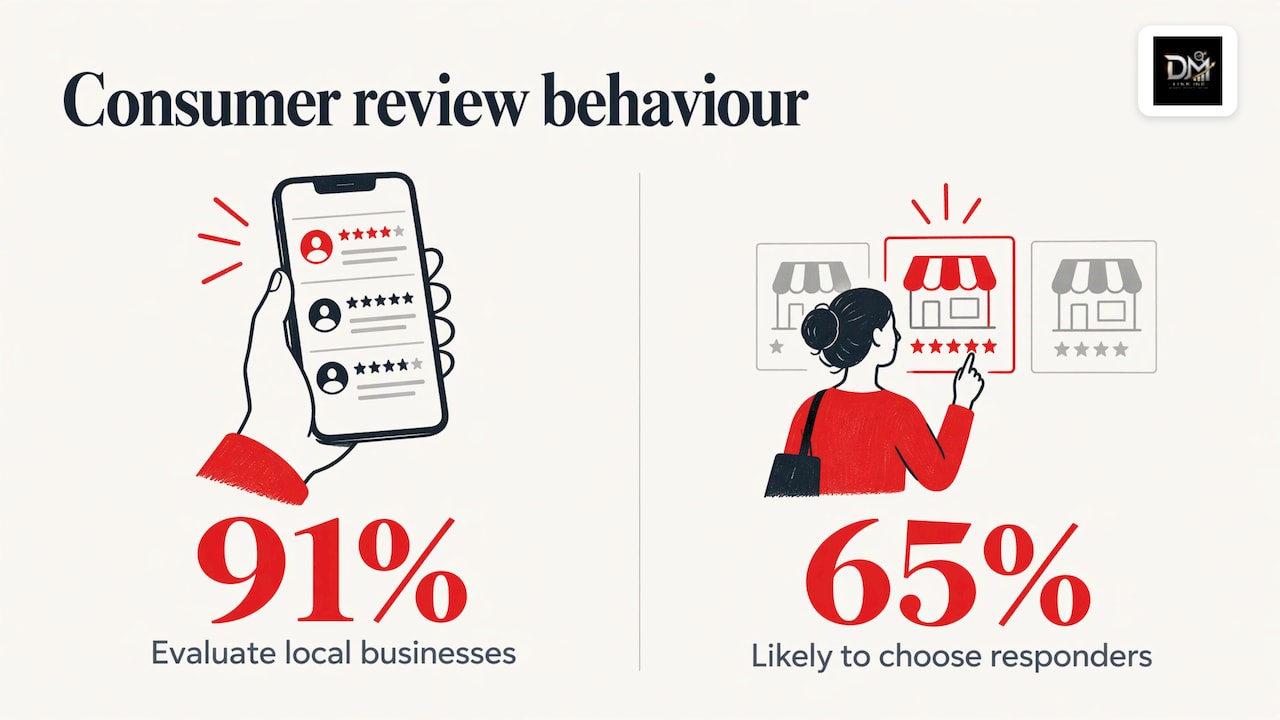
Reviews also shape the decision after the click. Google’s 2026 Business Profile playbook, citing its 2025 consumer survey, reports that 91% of consumers use reviews to evaluate local businesses and 65% say they are more likely to choose a business that responds to them. That survey is American, but the behaviour it describes is familiar to anyone who has chosen a restaurant or a contractor on a phone.
So a review programme does two jobs at once. It lifts the chance of being found, and it raises the chance that the person who finds you calls. If you want the ranking side in more depth, our piece on how reviews impact local SEO and Google Business Profile rankings covers it.
What Google review management actually involves
It helps to split the work into four jobs. Most businesses do the first one badly and skip the rest.
- Getting reviews. A steady, policy-safe invitation to every customer.
- Responding. A reply to every review, positive or negative.
- Protecting. Reporting reviews that are fake, off-topic or otherwise against Google’s rules.
- Learning. Measuring what is coming in and fixing what customers keep mentioning.
Underneath all four sits a complete, accurate Business Profile. Google advises a full address, correct hours including special hours, the right business category and relevant attributes, because complete and accurate profiles are more likely to appear in local results. A strong review stream attached to a profile with the wrong category or outdated hours wastes much of its value.
In Canada there is one more consideration: language. If your customers read both English and French, reviews and replies in both languages signal that you serve both. Our team works in authentic English and French, which matters in markets like Quebec, where local search behaviour differs from the rest of the country. Our guide to how local SEO helps small businesses grow in Quebec shows what that looks like in practice.
Build a review strategy that lasts
The aim is a system that produces reviews as a by-product of good service, not a campaign that spikes and stalls.
Ask at the moment the experience is fresh
The best time to ask is right after the job is done or the purchase is complete: at the till, in the follow-up email after an appointment, in the text that confirms a finished repair. Google recommends reminding customers to leave reviews with a link or a QR code, and you can create both from your Business Profile. A QR code works on a receipt, a menu, an invoice or a window sticker; a short link works in an email or text.
Ask everyone the same way. A process that only reaches customers you think are happy is selective, and it tends to produce a rating that looks too perfect. A simple script helps staff who feel awkward: “If you were happy with the work, a short Google review helps other people in the neighbourhood find us. Here’s the link.”
Offer nothing in return
This is the rule that catches well-meaning owners. Google’s Maps content policy does not allow merchants to offer incentives such as payment, discounts or free goods or services in exchange for a review, or for changing or removing one. It also bars soliciting content that does not represent a genuine experience.
The policy tightened again in 2026. Reporting on the April 2026 update says it added clauses on staff quotas and staff names in reviews, closing loopholes many local businesses had relied on, while still permitting you to ask for genuine reviews without incentives. In practice: do not set review targets for employees tied to rewards, and do not ask customers to mention a staff member by name for a prize or bonus.
There is a legal side as well. Canada’s Competition Bureau has warned that businesses can be liable for reviews posted by their employees when the business connection is not disclosed, and that anyone who writes or permits writing reviews giving a false or misleading impression could be liable under the Competition Act. Your team’s own reviews of your business, and of competitors, are a risk, not a shortcut.
Fix the cause, not only the count
The most durable review strategy is operational. Deliver an experience worth describing, remove friction from the invitation, and treat complaints as data. JWD Web Design argues that fixing recurring problems such as late arrivals or confusing invoices is worth more than sending more reminders. If three reviews in a month mention slow callbacks, no reply template will fix that; a changed process will.
Choose the right help for the programme
Some owners prefer to run this internally; others bring in an agency. If you go the agency route, it is worth knowing how to judge the return. A guide on getting the best ROI from your agency sets out what to ask about scope, fees and results before you sign. One question matters more than any other: does the provider do the work itself, and do you keep ownership of your profile, website and data afterward? With us, you speak directly to the team doing the work rather than an account manager, everything is delivered in-house, and you fully own your domain, hosting and data.
Respond to every review
Replies are public, and the next customer reads them as carefully as the review. Google advises keeping replies professional, short, simple, conversational and non-promotional.
Timing
A Google Business Profile community guide cites a 2022 ReviewTrackers report finding that 53% of customers expect a response within a week, and advises aiming to reply within 24 to 72 hours. Put a name on the task: one person owns the inbox, and a second covers holidays.
Speed on reviews connects to speed on leads. Reviews send people to call you, and a missed call wastes that effort; this playbook on responding to leads faster is worth reading alongside your review routine.
Replying to positive reviews
Thank the person by name, mention something specific they said, and stop. Do not paste a keyword-heavy sales line. A two-sentence reply that sounds like a person is better than a polished paragraph that sounds like a template.
Replying to negative reviews
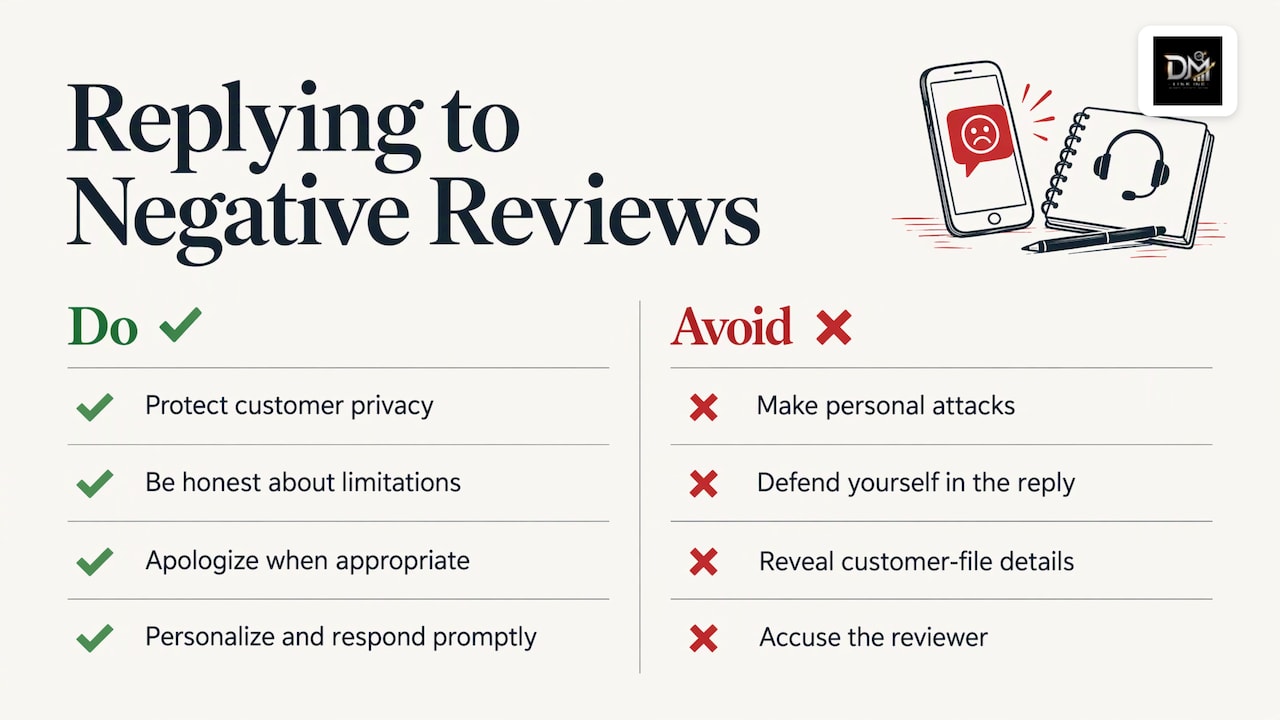
Google’s guidance for negative reviews is to protect privacy, avoid personal attacks, be honest about limitations, apologise when appropriate, personalize the reply and respond promptly. Here is a worked example for a plumbing company:
Review: “Waited three hours past the window, nobody called.”
Reply: “Thanks for telling us, Marc, and we’re sorry about the wait. A delayed callback isn’t how we want to work. Our office manager would like to hear the details so we can fix it: please reach us at the number on our profile.”
Notice what the reply leaves out: no defence, no account of the customer’s file, no accusation. It shows a future customer how you behave when something goes wrong. Google itself says a mix of positive and negative reviews can feel more trustworthy, and its community guide notes that a spotless 5-star rating can look inauthentic.
Two mechanics are worth knowing. You must verify your profile before you can reply. And Google’s Canadian help page explains that replies are checked against its content policies, usually within 10 minutes but sometimes up to 30 days, that the reviewer is notified, and that customers can edit their review afterward, which updates its date. A good reply sometimes earns an updated rating.
When a review can be reported, and when it cannot
No owner enjoys an unfair review, but the report button has a narrow purpose. Google says it will not remove content simply because a user or business dislikes it; removal decisions rest on its content policies and applicable local laws.
What is reportable, in plain terms:
- Reviews that do not reflect a genuine experience, including fake engagement and posts by competitors trying to undermine you.
- Reviews posted in exchange for payment or other incentives.
- Content that breaks the other categories in Google’s Maps content policy.
Google explains that every review goes through a moderation system that uses machine learning, with human operators reviewing flagged content around the clock. When they find violations, the review is removed, and sometimes the account is suspended. Businesses can flag reviews through dedicated reporting links.
If a report is rejected, the process does not end there. As reported in 2026, the Reviews Management Tool shows whether a report is pending, reviewed with no violation, or escalated, and if Google finds no violation the business gets one appeal covering up to 10 reviews, with a form explaining the specific violation and evidence.
If you think a review is defamatory under Canadian law, that is a separate question from Google policy. A Canadian legal commentary notes that disagreeing with a review does not make it eligible for removal, and that a legal request should identify the exact URL, the exact passage and the local right relied on. For that route, speak to a lawyer, not a marketing team.
For most owners the better response to an unfair but policy-compliant review is a calm public reply and a steady flow of new genuine reviews. There is no magic ratio; the effect of one negative review fades as recent, authentic reviews accumulate.
Measure review growth with a monthly scorecard
“Increase Google reviews” is a goal; a scorecard makes it manageable. JWD Web Design suggests tracking the number of eligible completed transactions, invitations sent, delivery failures or opt-outs, published reviews, response coverage and recurring issues. The useful distinction is that an invitation is an action you control, while a published review is a voluntary customer contribution that Google moderates.
| Metric | What it tells you | Example target |
|---|---|---|
| Completed jobs or sales | Your pool of people to ask | Count every one |
| Invitations sent | Whether the routine is actually running | As close to 100% of the pool as possible |
| Reviews published | Results of the routine | Trend upward over months |
| Response coverage | Whether every review gets a reply | 100% within 72 hours |
| Recurring themes | Operational problems to fix | Top three issues, reviewed monthly |
The example targets are our suggestions for setting up the sheet, not benchmarks. A simple rollout works well: build the profile and invitation in the first two weeks, make it routine in week three, and review the numbers in week four. Then leave the system alone long enough to see patterns, instead of changing tactics every few days.
For a wider view of what to watch beyond Google, see our guide to brand reputation monitoring.
Common mistakes that cost reviews
- Asking only happy customers. It skews your rating and breaks the “same for everyone” rule.
- Discounts for reviews. Prohibited, and the review can be removed.
- Bursts of reviews. Google says its systems watch for questionable patterns such as coordinated clusters or unusual bursts of 1- or 5-star reviews. A steady trickle looks like what it is.
- Ignoring the profile. Wrong category or outdated hours undercut everything above.
- Template replies. Customers notice copy-and-paste answers.
- Treating reviews as separate from the website. Reviews send people to your site; a slow or confusing page loses the call you just earned.
Perspective: reviews are part of a system you own
We see Google reviews as one part of local authority, not a trick for rating inflation. Ads rent you attention for as long as you keep paying. A complete profile, a website that turns visitors into calls, and a steady supply of real reviews build visibility you own.
That is why we put search, web design, digital marketing and reputation management in one team. When these services are split between providers, no one is responsible for the whole picture: the reviews go up, but the page they land on does not convert, or the page is excellent but the profile is incomplete. Our clients speak directly to the people doing the work, everything is delivered in-house, and the domain, hosting and data stay in the client’s hands.
Our advice to any owner is the same: ask everyone, offer nothing, reply to everything, and use what customers say to improve the business.
DM
Where we fit in
If you would rather not run this alongside everything else, our reputation and reviews service sits within our wider local growth work, alongside SEO and local search, web design and digital marketing. We start from where you actually lose visibility and revenue. Our free Leak-Proof Audit™ evaluates your local authority and pinpoints the areas where visibility and revenue are leaking, which is a sensible first look before you commit to any review programme.
You can see the full range on our services page, or start with reputation and reviews and local search and book the audit. If you are still weighing whether to hire help, our article on why hire a local SEO company lays out the reasoning.
FAQ
How do I increase Google reviews without breaking the rules?
Ask every customer after the job or purchase, using the direct link or QR code from your Business Profile. Do not offer discounts, gifts or anything else in exchange, and do not filter who you ask. Consistency over months beats any short burst.
Can I get an unfair Google review removed?
Only if it breaks Google’s content policy, for example fake engagement, a conflict of interest or content posted for an incentive. Google does not remove reviews just because a business disagrees with them. If the review looks defamatory, take it to a lawyer, and in the meantime post a calm public reply.
How quickly should I respond to reviews?
Aim for 24 to 72 hours, which is what Google’s community guidance suggests. Keep replies short and personal. Respond to negative reviews without sharing private details about the customer.
Do negative reviews hurt my ranking?
Google says more reviews and positive ratings can help local ranking, and it describes a mix of positive and negative reviews as more trustworthy to customers. A handful of critical reviews with thoughtful replies is normal. What matters is the overall pattern and recency.
Sources
- Tips to improve your local ranking on Google (Canada)
- Tips to improve your local ranking on Google
- Tips to get more reviews, Google Business Profile Help
- Google Business Profile Best Practices Playbook 2026
- Maps User Generated Content Policy: prohibited and restricted content
- Google tightens Maps review policy
- Competition Bureau: online reviews posted by employees
- How to get more Google reviews without violating Google’s policies
- Google Business Profile community guide: responding to Google reviews
- Gérer les avis des clients, Aide Google Profil d’entreprise
- Maps 101: How Google Maps reviews work
- Google Maps Content Trust & Safety Report
- How to get a Google review removed
- Cross-border Google reviews in Canada
- Getting the best ROI from your agency
- How to respond to leads faster